Official Portal:
GeM Portal
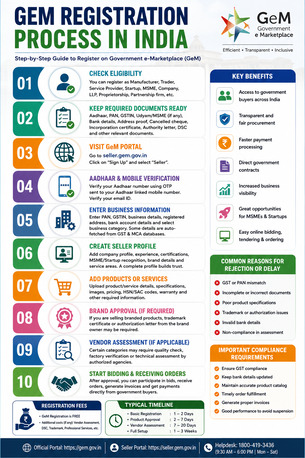
Step-by-Step GeM Registration Process
Step 1: Check Eligibility
You can register on GeM as:
Manufacturer
Trader
Service provider
Startup
MSME
LLP
Private Limited Company
Proprietorship
Partnership firm
NGO/Trust (eligible categories)
Both individuals and businesses can register depending on the service category.
Step 2: Keep Required Documents Ready
Basic Documents Required
For Proprietorship
Aadhaar card
PAN card
GST registration (if applicable)
Udyam/MSME certificate (optional but beneficial)
Bank account details
Mobile number linked with Aadhaar
For Company/LLP/Partnership
PAN of company
CIN/LLPIN
GST certificate
Incorporation certificate
Authorized signatory details
Bank details
Additional Documents
Cancelled cheque
Address proof
Product/service details
DSC (Digital Signature Certificate) for some activities
Step 3: Visit the GeM Registration Portal
Open:
GeM Seller Registration
Then click:
“Sign Up”
“Seller”
Step 4: Aadhaar & Mobile Verification
The portal verifies:
Aadhaar number
Linked mobile OTP
Email verification
For companies, the authorized signatory’s Aadhaar is generally used.
Step 5: Enter Business Information
Fill:
Business type
PAN validation
GSTIN
Registered office address
Bank details
Business category
The system may auto-fetch some data from GST and MCA databases.
Step 6: Create Seller Profile
Add:
Company profile
Business experience
Certifications
Brand information
MSME/Startup recognition
Service areas
A strong profile improves trust and visibility.
Step 7: Add Products or Services
Upload:
Product names
Technical specifications
Product images
Pricing
Warranty details
HSN/SAC codes
For services:
Scope of work
Pricing model
Service locations
Experience details
Step 8: Brand Approval (If Required)
If selling branded products:
Trademark certificate may be required
Authorization letter from brand owner may be needed for resellers
OEMs (Original Equipment Manufacturers) often get additional advantages.
Step 9: Vendor Assessment (Optional/Category-Based)
Certain product categories require:
Quality checks
Factory verification
Technical capability review
This is conducted by authorized agencies.
Vendor assessment helps improve credibility and eligibility for larger tenders.
Step 10: Start Bidding & Receiving Orders
After approval:
Participate in bids
Respond to government tenders
Receive direct purchase orders
Manage invoices and payments online
The portal supports:
Reverse auctions
Bidding
Direct procurement
BOQ orders
GeM Registration Fees
Registration Cost
Seller registration on GeM is generally free
Possible Additional Costs
Vendor assessment fee
Trademark registration
DSC purchase
Professional consultant charges (if used)
Official fee information:
GeM Fee Structure
Benefits of GeM Registration
Access to government buyers across India
Transparent procurement system
Faster payment processing
Direct government contracts
Increased business visibility
MSME and startup opportunities
Online tender participation
Common Reasons for Rejection or Delay
GST mismatch
Incorrect PAN details
Incomplete business documents
Poor product specifications
Trademark disputes
Invalid bank details
Non-compliance in vendor assessment
Important Compliance Requirements
Businesses should ensure:
GST compliance
Updated bank information
Accurate product catalog
Timely order fulfillment
Proper invoice generation
Poor seller performance can lead to suspension.
Typical Timeline
Process Approximate Time
Basic Registration 1–2 days
Product Approval 2–7 days
Vendor Assessment 7–20 days
Full Operational Setup 1–3 weeks